FluidRay
  • FREE TRIAL
  • Features
    • Technical Specs
    • Architectural Rendering
    • Interior Design Rendering
    • Jewelry Design Rendering
    • Product Design Rendering
  • Buy
  • Gallery
  • Resources
    • Contact Support
    • Help
    • Addons
    • Forum
  • Blog
  • Click to open the search input field Click to open the search input field Search
  • Menu Menu

Discover Why FluidRay is Considered the Easiest Renderer to Learn

May 27, 2020/in 3D Rendering, Basic UI, Tutorials & Training

More and more designers are using rendering tools to showcase their work to current and potential clients.  Whether you are creating architectural designs, interior designs, jewelry designs or other product designs, FluidRay is easy to incorporate into your workflow with our tutorials, support, and online community.

Benefits to incorporating a rendering tool into your design organization

  • Creating more detailed designs: Clients can better visualize the entire project and sample different items like materials, fixtures, paint colors and lighting. Seeing the final design makes it easy for a client to visualize their future building, room or product and ultimately select you as their designer. 
  • Saving money: By examining the design details early, issues and needed changes become apparent early. Addressing issues before construction begins or materials are purchased keeps the project moving forward and avoids costly delays. 
  • Impressing clients: Your design presentations will highlight your abilities in an impressive, easy-to-view format. Design is highly competitive and design presentations must be attention grabbing. Renderings do exactly that. Because of the real-time nature of FluidRay, you can adjust designs on the fly; creating more excitement and winning over even the most demanding of clients. 
  • Changing options in real time or quickly present multiple design options: Clients are notorious for not knowing exactly what they want or they change their minds several times during the design process. This is natural and should be expected and incorporated into timelines. Using a rendering tool, like FluidRay, allows for multiple design options to be shared and details to be modified in real-time to better facilitate the process. When clients can see multiple options, decisions are made quickly and efficiently shaving time off a project.
  • Communicating ideas: Effective communication of design ideas and iterations is certainly one of the most important aspects of the relationship between designer and client. Because of FluidRay’s real-time nature, modifications are made in seconds enabling communication between you and client to move forward efficiently.

When asked about incorporating a rendering tool into their organization, many designers indicate they don’t have the time or (frankly) the interest in learning another modeling tool. They aren’t able to spend time creating renderings when a 3d model created in Rhino, Sketchup, or similar is acceptable. While taking it to the next level would certainly be ideal, it is simply not worth the additional time and money. However, once these same designers realize how easy FluidRay is to learn and consider the benefits, they do in fact begin to use a rendering tool. This is exactly what happened to THE small HOUSE CATALOG. After displaying rendered designs on https://smallhousecatalog.com/, the company saw more than a 20% increase in online sales!

What makes FluidRay so easy to learn? 

  • Clear tutorials: FluidRay offers free tutorials that describe the details on how to create and refine renderings. Check out these examples or view them all on our HELP page. 

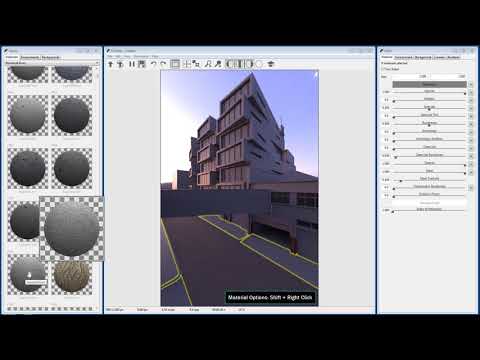
Interior Rendering Tutorial
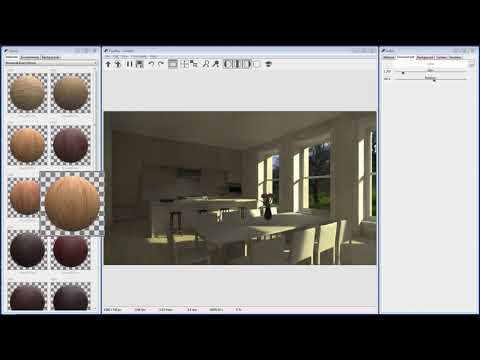
Interior Rendering in Rhino and FluidRay

Architectural Rendering Tutorial

Architectural Rendering in Rhino and FluidRay

Jewelry Rendering Tutorial

Jewelry Rendering with Rhino and FluidRay

  • Accessible costs: FluidRay offers a free 10 day trial to get designers up and running with no commitment. 

Once your free trial is complete, FluidRay offers an affordable monthly plan.

  • Available support: The FluidRay support team is available to help with issues and questions as you learn about the FluidRay features and create renderings. Simply submit a question and someone from support will get back to you quickly. Additionally the online community of FluidRay users posts questions and answers to help other users navigate the tool. 
  • Works on most Windows or Mac computers: FluidRay doesn’t require any special equipment or high powered machines. Simply download FluidRay and start rendering in minutes. 
  • Real-time renderings: You can see your work immediately and make real time adjustments as needed. No waiting to see if your design looks right. 

Are you ready to learn rendering for your next design project? Our pricing is inexpensive and we offer a free trial so you can see how fast and easy it is to turn your 3D models into realistic images that will inspire your clients. To learn how to create beautiful renderings in FluidRay, we provide a library of training tutorials. Experience the good side of rendering today!


https://www.fluidray.com/wp/wp-content/uploads/2020/04/render3_pp.jpg 1080 1920 Julie Hobart /wp/wp-content/uploads/2019/09/siteLogo4.png Julie Hobart2020-05-27 23:05:482020-05-27 23:05:53Discover Why FluidRay is Considered the Easiest Renderer to Learn

Customer Spotlight: How THE small HOUSE CATALOG Uses FluidRay to Bring Designs to Life

May 12, 2020/in 3D Rendering, Architecture

Have you ever dreamed of owning a small house, living simply, and only with your essentials? Shawn Dehner brings this dream to reality. He runs THE small HOUSE CATALOG, an architectural design company that creates both custom and stock plans for clients located all over the United States, Canada, and beyond. 

“This is truly a great product that I’m excited to be using. It’s one of a kind!”

SHAWN DEHNER Owner, THE small HOUSE CATALOG

Architectural design is a very visual industry. Shawn had long been wanting to take his designs to the next level in terms of presentation for both custom design clients and stock plan customers. The simple schematic presentations were lacking the storyline he wanted to share. Additionally, feedback from his tens of thousands of blog subscribers was for additional interior and exterior images of the designs. This was one of the top requests from Shawn’s subscribers in 2019. It is clear that his followers wanted to be able to better visualize themselves living in a small house. Shawn determined it was time to learn rendering so he could share realistic images of his small house designs. 

Sommerhus

Every week Shawn is hired by a variety of client types. Homeowners make up most of his custom business but he also supplies builders and prefab construction companies. The stock plans found on THE small HOUSE CATALOG website sell daily to a mix of customers including individuals, builders and schools. With this diverse customer base, Shawn needed to find a rendering tool that could create many renderings that appeal to a lot of people with a lot of uses. The tool also needed to be capable of creating renderings quickly and easily.

“I have to tell you, FluidRay really just worked for me right out of the box. I’d struggled with some other top notch competitors and I could not get them to function well. I found FluidRay one night surfing for rendering reviews and came across videos created by the company. I thought the renderings looked gorgeous and every bit on par with other rendering engines I was trying – and better generally. Also, the UI seemed to make sense – and it does. I was sincerely thrilled and relieved to find FluidRay.”

Kukui

Shawn quickly discovered how easy it was to download and learn FluidRay using the intuitive interface and the tutorials available on FluidRay’s website. With Shawn’s renderings on his website, smallhousecatalog.com, visitors can now click through different home design images and tour each house. The renderings allow visitors to visually take in cathedral ceilings, look out large windows, check out flooring materials, examine storage compartments, and more. On top of the easy-to-follow tutorials, Shawn finds the customer support team responsive and helpful for anything he can’t answer on his own. 

“Whenever I have an issue it’s replied to and addressed quickly. I find this incredible in today’s world.”

Moschata

While FluidRay is a subscription based service, Shawn is delighted with how affordable it is, even for a small business. And because Shawn is the only designer at THE small HOUSE CATALOG, he has very little extra time to create renderings. Since FluidRay is so easy to learn and use, Shawn is able to create renderings, complete his monthly plan releases, and take care of his clients.

THE small HOUSE CATALOG has fully incorporated FluidRay into its business process and is now creating jaw-dropping renderings using FluidRay. Shawn prefers an “artsy” style to his client presentations and he is able to achieve exactly this with FluidRay. He is able to create renderings that add clarity to projects and help set a tone and tell a story about each small house design. Considering that THE small HOUSE CATALOG stock design sales are up 20-25% each month so far in 2020, FluidRay has become an essential part of THE small HOUSE CATALOG!

Are you ready to try rendering for your architectural designs? Our pricing is inexpensive and we offer a free trial so you can see how fast and easy it is to turn your 3D models into realistic images that will inspire your clients. To learn how to create beautiful renderings in FluidRay, we provide a library of training tutorials. Experience the good side of rendering today!

https://www.fluidray.com/wp/wp-content/uploads/2020/05/Ithacaclouds.jpg 844 1500 Julie Hobart /wp/wp-content/uploads/2019/09/siteLogo4.png Julie Hobart2020-05-12 21:13:232020-05-12 21:13:29Customer Spotlight: How THE small HOUSE CATALOG Uses FluidRay to Bring Designs to Life
Search Search
Free Demo
Try FluidRay
FREE for 10-days
Download Now

Categories

  • 3D Rendering
  • Animation
  • Architecture
  • Basic UI
  • Compatibility
  • Industrial Design
  • Interior Design
  • Jewelry Design
  • Lighting
  • Managing Assets
  • Materials
  • Misc
  • News
  • Nodes
  • Obsolete
  • Plugins-Integrations
  • Post-Processing
  • Product Design
  • Rhino
  • Rhino
  • SketchUp
  • Software Releases
  • Tutorials & Training
  • Uncategorized

Recent Posts

  • Top 5 Tips for a Professional Interior Design Rendering August 28, 2021
  • FluidRay: Our 10 Favorite Kitchen Renderings July 24, 2021
  • How to Render Animations in FluidRay June 10, 2021
  • Learn How to Master a Rendering Tool – FAST! May 24, 2021
  • FluidRay: Our 10 Favorite Bedroom Interior Renderings April 21, 2021

Archives

© Copyright Fluid Interactive Inc. 2025 | All Rights Reserved.
  • Link to X
  • Link to Facebook
  • Link to Instagram
  • Link to Youtube
  • Terms Of Service
  • EULA
  • Privacy Policy
Scroll to top Scroll to top Scroll to top

This site uses cookies. By continuing to browse the site, you are agreeing to our use of cookies.

Learn moreOK

Cookie and Privacy Settings


How we use cookies

We may request cookies to be set on your device. We use cookies to let us know when you visit our websites, how you interact with us, to enrich your user experience, and to customize your relationship with our website.

Click on the different category headings to find out more. You can also change some of your preferences. Note that blocking some types of cookies may impact your experience on our websites and the services we are able to offer.

Essential Website Cookies

These cookies are strictly necessary to provide you with services available through our website and to use some of its features.

Because these cookies are strictly necessary to deliver the website, refusing them will have impact how our site functions. You always can block or delete cookies by changing your browser settings and force blocking all cookies on this website. But this will always prompt you to accept/refuse cookies when revisiting our site.

We fully respect if you want to refuse cookies but to avoid asking you again and again kindly allow us to store a cookie for that. You are free to opt out any time or opt in for other cookies to get a better experience. If you refuse cookies we will remove all set cookies in our domain.

We provide you with a list of stored cookies on your computer in our domain so you can check what we stored. Due to security reasons we are not able to show or modify cookies from other domains. You can check these in your browser security settings.

Other external services

We also use different external services like Google Webfonts, Google Maps, and external Video providers. Since these providers may collect personal data like your IP address we allow you to block them here. Please be aware that this might heavily reduce the functionality and appearance of our site. Changes will take effect once you reload the page.

Google Webfont Settings:

Google Map Settings:

Google reCaptcha Settings:

Vimeo and Youtube video embeds:

Accept settingsHide notification only